Adjusting the Feet
WARNING

WARNING
In order to ensure that the product operates more silently and vibration-free, it must stand level and balanced on its feet. Ensure that the product is balanced by adjusting the feet. Otherwise, the product may move from its place and cause crushing, noise and vibration problems.
To avoid damaging the lock nuts, do not use any tools to loosen the nuts.
- Loosen the lock nuts on the feet by hand.
- Adjust the feet until the product stands level and balanced.
- Tighten all lock nuts again by hand.
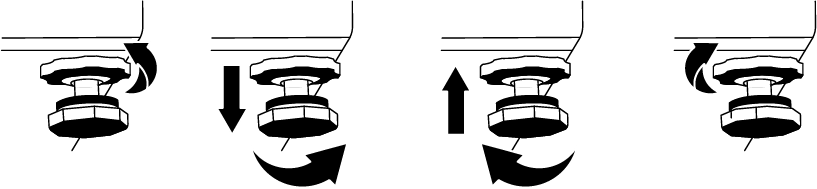
Adjusting the Feet with the Water Level Indicator:
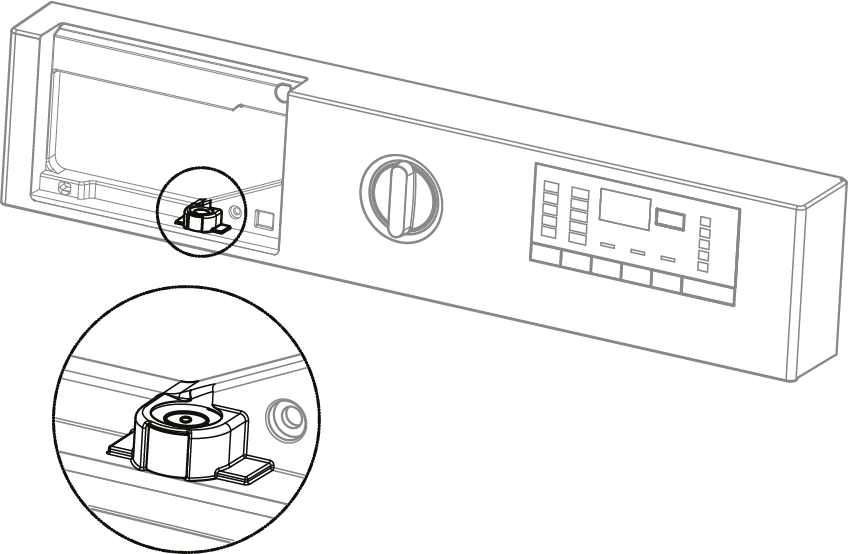
- To adjust the Water Level Indicator, you must remove the Detergent Drawer.
- The bubble inside the Water Level Indicator must be in the middle for the system to work correctly.
- If the bubble inside the Water Level Indicator is on the left, the right preset foot of the Washing Machine must be adjusted.
- If the bubble inside the Water Level Indicator is on the right, the left preset foot of the Washing Machine must be adjusted.
- If the bubble inside the Water Level Indicator is on the rear, the front preset foot of the Washing Machine should be turned left (clockwise).
- If the bubble inside the Water Level Indicator is on the front, the front preset foot of the Washing Machine should be turned right (counterclockwise).