Control Panel of the Product
Read the "Safety Instructions" first!
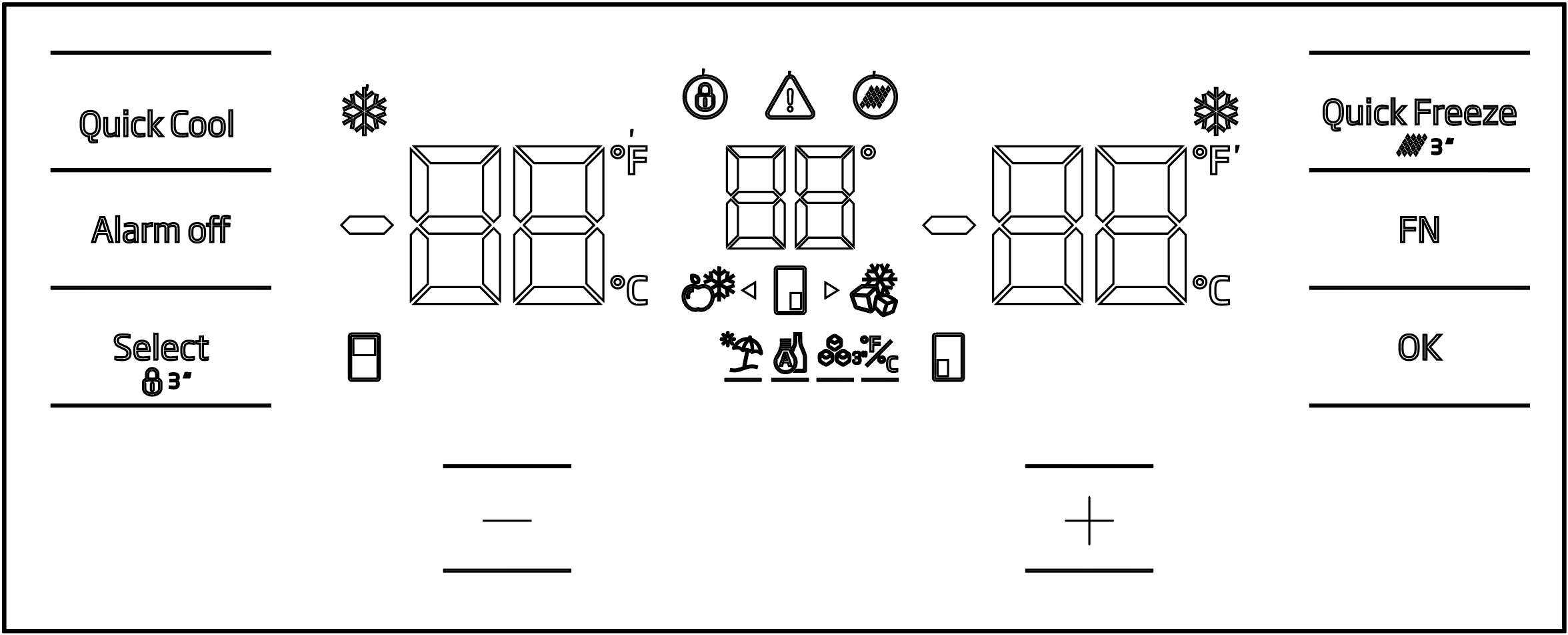
The audio and visual functions on the instrument panel help you use the product.
*Optional: The functions shown are optional; the functions on your product's instrument panel may differ in shape and location.
Fast cooling function indicator 
It lights up when the rapid cooling function is activated.
Refrigerator compartment temperature indicator 
The refrigerator compartment temperature is displayed and can be set to 8, 7, 6, 5, 4, 3, 2, 1.
*Fahrenheit indicator 
This is the Fahrenheit display. When the Fahrenheit display is activated, the temperature set values are displayed in Fahrenheit and the corresponding icon lights up.
*Key lock 
Press and hold the key lock button simultaneously for 3 seconds. The key lock icon will appear.
The light will turn on and the key lock mode will be activated. When key lock mode is activated, the buttons will not work. Press the key lock button again simultaneously for 3 seconds. The key lock icon light will turn off and key lock mode will be exited.
If you want to prevent the product's temperature setting from being changed, press the key lock button.
*Power outage/High temperature/Error warning 
This indicator lights up in case of power outage, high temperature malfunction, and error warnings. In the event of a prolonged power outage, the hottest temperature reached by the freezer compartment will flash on the digital display. The warning can be cleared by pressing the alarm off button after checking the freezer compartment contents.
If you see this indicator lit up, please refer to the "troubleshooting" section in your manual.
*Filter reset icon 
This icon lights up when the filter needs to be reset.
Temperature control cabinet icon 
This indicates the cabinet whose temperature is to be changed. When the temperature change cabinet icon starts flashing, it means the relevant cabinet has been selected.
*Joker freezer icon 
When you hover over the Joker freezer icon while holding down the FN button, the icon will start blinking. When you press the OK button, the Joker freezer icon will light up and it will function as a freezer.
Freezer compartment temperature indicator
The freezer compartment temperature is displayed and can be set to -16, -18, -19, -20, -21, -22, -24.
Quick freeze function indicator 
It lights up when the quick freeze function is activated.
*Fahrenheit indicator
This is the Fahrenheit display. When the Fahrenheit display is activated, the temperature set values are displayed in Fahrenheit and the corresponding icon lights up.
Quick freeze function button 
Press this button to activate or deactivate the quick freezing function. When activated, the freezer compartment will be cooled to a temperature lower than the set temperature.
Use the quick freeze function when you want to quickly freeze food placed in the freezer compartment. If you want to freeze a large quantity of fresh food, activate the function before placing the food inside.
If the water in your tank remains there for more than 2-3 weeks, it is recommended to change the water.
If the quick freeze function is not deactivated, it will automatically deactivate after a maximum of 24 hours or when the cooling compartment reaches sufficient coldness.
This function is not remembered after a power outage.
*Filter reset 
Pressing the quick freeze button for 3 seconds resets the filter. The filter reset icon will disappear.
*FN button 
This key is used to navigate between the desired functions. When this key is pressed, the icon and indicator for activating or deactivating the function will start flashing. If this key is not pressed for 20 seconds, the FN key will become deactivated; it must be pressed again to change functions.
*Celsius indicator 
This is the Celsius display. When the Celsius display is activated, the temperature set values are shown in Celsius and the corresponding icon lights up.
OK button 
After navigating between functions using the FN button, the corresponding icon and indicator will blink when the function is canceled using the OK button. When the function is activated, the function remains lit, and the indicator continues to blink to show which icon it is currently under.
*Temperature change cabinet icon 
This indicates the cabinet whose temperature is to be changed. When the temperature change cabinet icon starts flashing, it means the relevant cabinet has been selected.
*Temperature change cabinet icon 
This indicates the cabinet whose temperature is to be changed. When the temperature change cabinet icon starts flashing, it means the relevant cabinet has been selected.
Set upgrade button 
By pressing the Select button, the relevant cabin is selected, and the cabin icon representing that cabin will start flashing. Pressing the Set Up button during this process will increase the set value. Continuously pressing the button will reset the set value.
Temperature change cabinet icon 
This indicates the cabinet whose temperature is to be changed. When the temperature change cabinet icon starts flashing, it means the relevant cabinet has been selected.
Adjusting the Celsius and Fahrenheit display
Press the FN key to select this function, then use the arrow keys to select Fahrenheit and Celsius. The Fahrenheit and Celsius indicators will light up once the selected temperature type is chosen.
*Ice maker on icon 
To turn on the ice maker, press and hold the FN key until you reach the ice icon and its underline. The ice maker on icon and the ice maker function indicator will start flashing, indicating that the ice maker can be turned on and off. Pressing the OK button will keep the ice maker icon lit, while the indicator continues to flash. After 20 seconds, if no button is pressed, the icon and indicator will remain lit, indicating that the ice maker is now on. To turn off the ice maker, again reach the icon and indicator and press the OK button. Both the ice maker icon and indicator will start flashing. After 20 seconds, if no button is pressed, the icon and indicator will turn off, indicating that the ice maker is now off.
This indicates whether the ice maker is working or not.
When this function is not selected, water will stop being drawn from the water tank. However, ice previously made in the ice maker can still be removed.
*Holiday function icon 
To activate the vacation function, press and hold the FN key until you reach the umbrella icon and its underscore. The vacation function icon and indicator will start blinking, indicating that the vacation function is active and about to be activated. Pressing the OK button will keep the vacation function icon lit, activating the function, while the indicator continues to blink. To deactivate the vacation function, press the OK button again; both the icon and indicator will start blinking, deactivating the function.
*Joker cooler icon 
When the wildcard cooler icon is selected using the FN button and the OK button is pressed, the wildcard cooler returns to its original state and functions as a cooler.
Celsius indicator
This is the Celsius display. When the Celsius display is activated, the temperature set values are shown in Celsius and the corresponding icon lights up.
*Set reduction button 
By pressing the Select button, the relevant cabin is selected, and the cabin icon representing that cabin will start flashing. Pressing the Set Decrease button during this process will decrease the set value. If pressed repeatedly in a cyclical manner, the set value will reset.
*Temperature change cabinet icon 
This indicates the cabinet whose temperature is to be changed. When the temperature change cabinet icon starts flashing, it means the relevant cabinet has been selected.
*Temperature change cabinet icon 
This indicates the cabinet whose temperature is to be changed. When the temperature change cabinet icon starts flashing, it means the relevant cabinet has been selected.
*Key lock 
Press and hold the key lock button simultaneously for 3 seconds. The key lock icon will appear.
The light will turn on and the key lock mode will be activated. When key lock mode is activated, the buttons will not work. Press the key lock button again simultaneously for 3 seconds. The key lock icon light will turn off and key lock mode will be exited.
If you want to prevent your product's temperature setting from being changed key lock Press the button.
*Select button 
This button is used to select the cabinet whose temperature you wish to change. Pressing this button cycles through the cabinets. The cabinet icons (7, 17, 18, 20, 28, 29) indicate which cabinet has been selected. If a cabinet icon is flashing, the cabinet whose temperature set value you wish to change has been selected. Then, the set value is changed by pressing the cabinet set value decrease button (27) and the cabinet set value increase button (19). If the select button is not pressed for 20 seconds, the cabinet icons will turn off. To select a cabinet again, you need to press this button.
*Alarm off warning 
In case of a power outage/high temperature alarm, the warning is cleared by pressing the alarm off button after checking the food in the freezer compartment.
*Fast cooling function button 
The button has two functions. Press and release to enable or disable the fast cooling function. The fast cooling indicator will turn off, and the product will return to its normal settings.
Use the quick cooling function when you want to quickly cool the food you place in the cooler compartment. If you want to cool a large quantity of fresh food, activate the function before placing the food inside.
If the rapid cooling function is not deactivated, it will automatically deactivate after a maximum of 1 hour or when the freezer compartment reaches sufficient cold.
If you press the quick cooling button repeatedly in short intervals, the electrical circuit protection will be activated and the compressor will not start immediately.
This function is not remembered after a power outage.
*Joker temperature gauge
The Joker cabinet's temperature set values are displayed.
*Wine cooler temperature gauge
The wine cooler temperature settings are displayed on the screen.