Setting the Operating Temperature
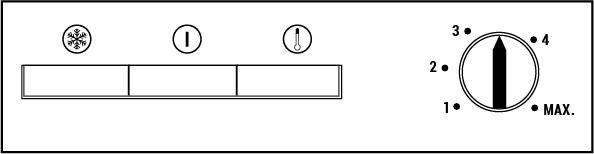
The operating temperature is set by the temperature control.
1=Lowest cooling setting (Warmest setting)
MAX. = Highest cooling setting (Coldest setting)
Please select a setting based on the desired temperature.
The internal temperature also depends on the ambient temperature, the frequency with which the door is opened and the amount of food stored inside.
Frequent opening of the door causes the internal temperature to rise.
Therefore, it is recommended that you close the door as soon as possible after use.
The normal storage temperature of your unit should be -18 °C (0 °F). Lower temperatures can be achieved by moving the thermostat knob towards the MAX position.
We recommend checking the temperature with a thermometer to ensure that the storage compartments are at the desired temperature. Remember to read the temperature immediately after removing it from the freezer, as the thermometer temperature rises very quickly.
Indicator Lights
Inside the appliance there are three colored indicator lights that show the operating mode of the freezer.
Yellow Indicator
It illuminates when the thermostat knob is turned to the MAX. position and remains illuminated until the quick freeze is manually deactivated.
The quick freeze operation is for freezing fresh food.
Green Indicator
It comes on when the appliance is connected to the mains and stays on as long as there is power. The green indicator does not give any information about the temperature inside the freezer.
Red Indicator High Temperature Alarm
After the appliance is switched on for the first time, the alarm is inactive for 12 hours (the red LED indicator turns off), after which time the red LED indicator lights up in the following cases:
- An excessive amount of fresh food is placed in the appliance
- If the door is accidentally left open.
In these cases, the red LED indicator will remain on until the appliance reaches the preset temperature. If the red LED indicator is still lit, wait 24 hours before calling for service.
Thermostat Knob
The thermostat switch is located above the frame of the control lamp.
Important!
If you press the quick freeze button or make a correction to the set temperature, there may be a short delay before the compressor starts to run. This is normal and does not represent a malfunction of the compressor.
Freezing
Freezing food
You can use the appliance to freeze fresh food as well as to store food that has already been frozen.
Please follow the recommendations on the packaging of your food.
• Caution.
Do not freeze carbonated beverages as the bottle may burst if the liquid inside freezes. Be careful with frozen products such as colored ice cubes. Do not exceed the freezing capacity of your unit within 24 hours. Refer to the nameplate.
To preserve food quality, freezing should be done as soon as possible. This will ensure that the freezing capacity is not exceeded and that the temperature in the freezer does not rise.
• Caution.
Always store already frozen foods separately from newly frozen foods. If you freeze hot food, the refrigeration compressor will run until the food is completely frozen. This may temporarily overcool the freezer compartment. Do not worry if you have difficulty opening the freezer door immediately after closing it. This is due to the pressure difference, which will equalize after a few minutes and allow the door to open normally. Immediately after closing the door, you will hear a vacuum sound. This is quite normal.
Quick freezing
If a large amount of fresh food is to be frozen, set the knob to the maximum 24 hours position before placing the fresh food in the quick freezer compartment. It is strongly recommended that the knob be set to MAXIMUM for at least 24 hours in order to freeze the maximum amount of fresh food listed as freezing capacity. Take special care not to mix frozen foods with fresh foods. Remember to return the thermostat knob to the previous position after freezing the food.
Defrosting
The freezer compartment defrosts automatically.